
01
Local Browser Processing
Frames are decoded on your device. The standard maker never uploads your art.
Game-ready sheets, made in your browser
Turn PNG, JPG, and WebP frames into a clean sheet without installing an editor. This free online sprite sheet maker keeps images local and exports a crisp game-ready PNG.
Local Processing
Your frames stay on this device.
No Login Required
Start creating immediately.
Clean PNG Export
Sharp cells, ready for engines.

The tool is the homepage
Upload frames, reorder them, choose a grid, and inspect the result before downloading. The sprite sheet maker runs in your browser, so regular image projects need no server round trip.


Preview example
Upload your own frames to start editing.
Add your own frames to enable export. Files stay in your browser.
A connected sprite workflow
This sprite sheet maker handles image composition. Focused companion tools cover conversion, cutting, and animation preview.
Convert GIF frames into a grid while preserving order and transparency.
Try NowPreview a sprite sheet as an animation, then encode and download a shareable GIF.
Try NowChoose a time range and FPS, then pack extracted poses into a sheet.
Try NowSplit a sheet with grid, offset, and spacing controls, then download frames.
Try NowPlay a sheet with FPS, loop, reverse, and ping-pong controls.
Try NowCreate a constrained sixteen-frame concept from a reference or text description.
Try NowA preset made for game animation
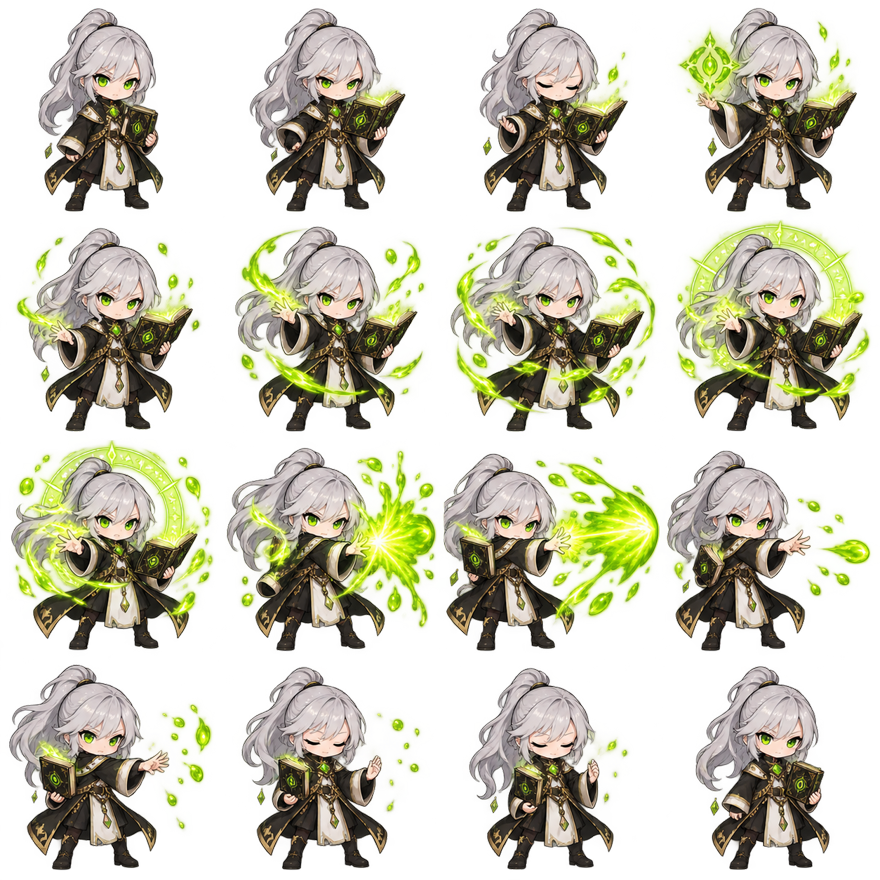
The sprite sheet maker's 4×4 preset gives sixteen frames a stable row-major structure for walks, attacks, casts, and generated concepts. Empty positions remain visible, and bottom alignment keeps feet from jumping.
A short, repeatable workflow
The online sprite sheet maker moves from source files to a finished sheet in four clear actions while preserving production controls.
Select PNG, JPG, or WebP images. Numeric filenames are sorted naturally.
Reorder frames, then choose Auto Grid, 4×4, or a horizontal strip.
Adjust the grid, padding, spacing, and background while the canvas updates.
Download a transparent or filled PNG, ready for Unity, Godot, or your renderer.
Features
A useful sprite sheet maker removes repetitive layout work without hiding important decisions. These controls turn loose frames into a predictable asset.
01
Frames are decoded on your device. The standard maker never uploads your art.
02
Sort naturally, drag thumbnails, or use accessible buttons. Reverse and duplicate without renaming files.
03
Preview and download share the same cells, spacing, padding, alignment, and background.
04
Split an existing sheet with manual grid controls and clear cutting guides.
05
Inspect timing, loops, and frame order before importing into your game engine.
06
Create a constrained 4×4 concept from text or a reference image, then inspect it.
Original output examples
These original characters show readable sequences you can organize with the sprite sheet maker. Each uses a fixed camera, stable scale, and clear action progression.
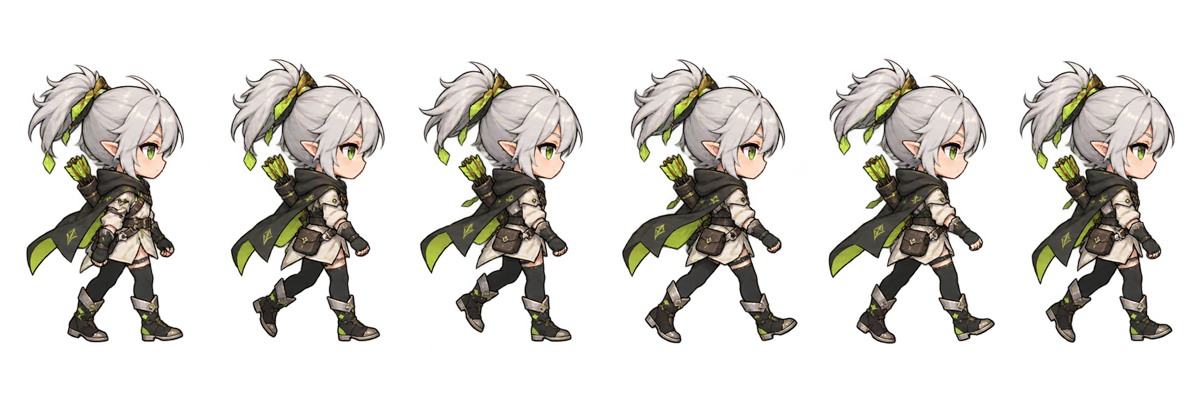
A side-view walk with a steady ground line and readable pose changes.

Wind-up, strike, follow-through, and recovery in one compact sequence.
Sixteen chronological spell frames arranged for quick preview and export.

A fast loop with clear airborne frames and consistent character scale.
Practical references
The sprite sheet maker works best with good source frames. These references explain formats, dimensions, and layout choices.
Learn how one texture stores animation frames and when to use a strip or grid.
Read Guide02Prepare consistent frames, verify alignment, and export a sharp game asset.
Read Guide03Compare cell sizes, power-of-two textures, canvas limits, and practical dimensions.
Read Guide04Understand padding, gutters, texture bleeding, and separation between neighboring sprites.
Read GuideCommon questions
Clear answers about privacy, formats, 4×4 layouts, and using the exported file in a real game project.
A sprite sheet maker combines animation frames into one grid or strip. A game engine reads its cells in sequence for walks, attacks, and effects.
Choose frames above, check their order, select a grid, and adjust spacing while watching the preview. The free sprite sheet maker works locally without an account.
Yes. This sprite sheet maker accepts PNG, JPG, and WebP. PNG is ideal for transparency. Consistent dimensions and a shared baseline produce cleaner results.
Yes. Select 4×4 / 16 Frames. The preset uses row-major order and still lets you control padding, spacing, and background.
No. The standard maker decodes files and creates downloads locally. AI generation uses a remote model, and its page explains that separate process.
The homepage accepts PNG, JPG, and WebP, then exports PNG. GIF and video use separate converters for decoding and timing controls.
Both terms often overlap. Maker suggests arranging existing frames, while generator can include extraction or AI. This spritesheet maker connects all those workflows.
Yes. Import the PNG, enter the same grid and spacing, and use nearest-neighbor filtering for pixel art. Consistent cells simplify animation setup.